n8n Automation
Automate repetitive workflows with n8n
Connect your tools, automate repetitive processes and build flexible business workflows with n8n automation from AVR Web Consulting.
Quick answer
n8n is a workflow automation platform that connects applications, APIs, databases and services so repetitive processes can run automatically. AVR Web Consulting designs, builds and tests n8n workflows for tasks such as lead handling, notifications, data synchronisation and reporting, with error handling and monitoring built in.
- Platform
- n8n
- Connects
- Apps, APIs, databases
- Built with
- Testing & error handling
- Works with
- AI agents
Key Takeaways
- Expert strategies tailored for n8n Automation Services — Workflow Automation
- Data-driven approach without relying on guesswork
- Focus on sustainable, long-term search visibility
- Fully aligned with modern Answer Engine and AI search requirements
What is n8n?
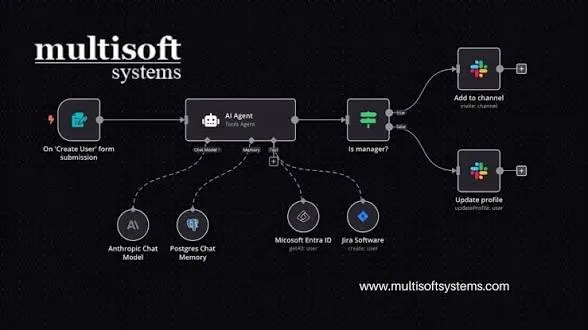
n8n is a workflow automation platform. A workflow is a sequence of steps that starts from a trigger — a form submission, a scheduled time, a webhook, a new record — and then moves data between applications, transforms it, applies conditions and performs actions.
Because it can talk to APIs and databases directly, it is not limited to a fixed list of shortcuts. It suits processes that involve several tools and a few decisions along the way.
What we can automate
Examples of workflows we build
- Lead collection from website forms into a sheet, database or CRM
- Lead notifications to email, chat or messaging channels
- Form-to-email workflows with formatting and routing rules
- CRM workflows such as record creation, updates and follow-up reminders
- Data synchronisation between two systems that do not talk to each other
- Notifications and alerts based on conditions or thresholds
- Content workflows for scheduling, distribution and internal review
- Reporting workflows that assemble data and send a summary on a schedule
- API-based workflows that call and combine external services
- Business process automation for internal, repeatable procedures
Scoped to the process
These are examples, not a promise that every process in a business can be automated. We look at the process first and say honestly which parts are worth automating.
How an automation works
- 1TriggerA form submission, webhook, schedule or change in a connected system starts the workflow.
- 2Data collectionThe workflow gathers the relevant data from the trigger and any connected sources.
- 3ProcessingData is cleaned, formatted, validated or combined so the next steps can use it.
- 4DecisionConditions decide which path to follow, so different cases are handled differently.
- 5ActionRecords are created or updated, messages sent, files generated or APIs called.
- 6Notification / storageThe result is stored and the right people are informed, including when something fails.
Capabilities we work with
- Workflow automation across multiple steps and branches
- API integrations with services that expose an interface
- Webhooks for receiving events from other applications
- Data processing: mapping, formatting, filtering and transformation
- Conditional workflows that respond differently to different inputs
- Multi-step workflows that carry data through a longer process
- Application integrations between the tools your team already uses
Business benefits
- Reduce repetitive manual work such as copying data between systems
- Improve consistency, because the same steps run the same way every time
- Connect tools that were never designed to work together
- Save operational time on routine coordination and follow-ups
- Reduce manual data transfer, and the errors that come with it
- Create repeatable processes that do not depend on one person remembering them
Considerations and limitations
Automation removes repetitive work; it does not remove responsibility for the process. A workflow that is not monitored will eventually fail quietly when an API changes or a credential expires.
- Correct workflow design matters more than the number of automations
- Testing with real data before the workflow handles anything important
- Monitoring, so failures are noticed rather than discovered weeks later
- Error handling and retries for steps that depend on external services
- Maintenance when connected applications change their APIs or plans
- Secure credential management and least-privilege access for each connection
Frequently asked questions
Get an AI visibility & SEO audit
Tell us your target keywords and markets. We reply within one business day with findings, priorities and a tailored proposal.
